Showing posts with label iPhone. Show all posts

Friday, December 26, 2025

Learn From the Bible Book Pīnyīn Plus Material JW Library App Scripture Links

In the _Learn From the Bible_ book _Pīnyīn_ Plus material, beginning in Lesson 48 for now, *JW _nwtsty_* scripture links are now available that go to the scriptures in the JW Library app, when tapped on an iPhone or iPad. (Android has not been tested yet.) troubadourworks.com/tiandi/lf...

[image or embed]

— tiandi, Links News (@tiandilinksnews.bsky.social) Dec 26, 2025 at 11:11 PM

On an Apple Silicon Mac, when the *JW _nwtsty_* links are clicked in a WebKit-based browser like Safari or Orion, they go to the scriptures in the JW Library app. On other browsers, they go to the scriptures on jw.org. troubadourworks.com/tiandi/lfb/P...

[image or embed]

— tiandi, Links News (@tiandilinksnews.bsky.social) Dec 26, 2025 at 11:24 PM
>

Saturday, April 19, 2025

Proofread Musical Notation 🎼 with Pīnyīn Lyrics Available for the Concluding Song for Mandarin 2025 Conventions

Proofread Musical Notation 🎼 with _Pīnyīn_ Lyrics Available for the Concluding Song for Mandarin 2025 Conventions (proofread, mobile-friendly, adjustable text size, zip file for offline use…) https://troubadourworks.com/tiandi/sjj/Pinyin_Plus/

[image or embed]

— tiandi, Links News (@tiandilinksnews.bsky.social) Apr 19, 2025 at 6:36 a.m.

Thursday, March 27, 2025

Proofread _Pīnyīn_ Plus Lyrics Available for the Concluding Song for the Mandarin 2025 Convention

Proofread _Pīnyīn_ Plus Lyrics Available for the Concluding Song for the Mandarin 2025 Convention (proofread, mobile-friendly, adjustable text size, zip file for offline use…) https://troubadourworks.com/tiandi/sjj/Pinyin_Plus/

[image or embed]

— tiandi, Links News (@tiandilinksnews.bsky.social) March 27, 2025 at 12:48 AM

Friday, September 20, 2024

MEotW: miǎománg

The Mandarin Expression of the Week is:

How does the Mandarin expression “_miǎománg_” illustrate how remote the possibility is that life originated by chance?


NASA photo of the Pacific Ocean, as seen from space

Comments are enabled on this blog, so if you are so inclined, comment away!


A news feed for this blog is available here.


Saturday, August 24, 2024

MEotW: app

The Mandarin Expression of the Week is:

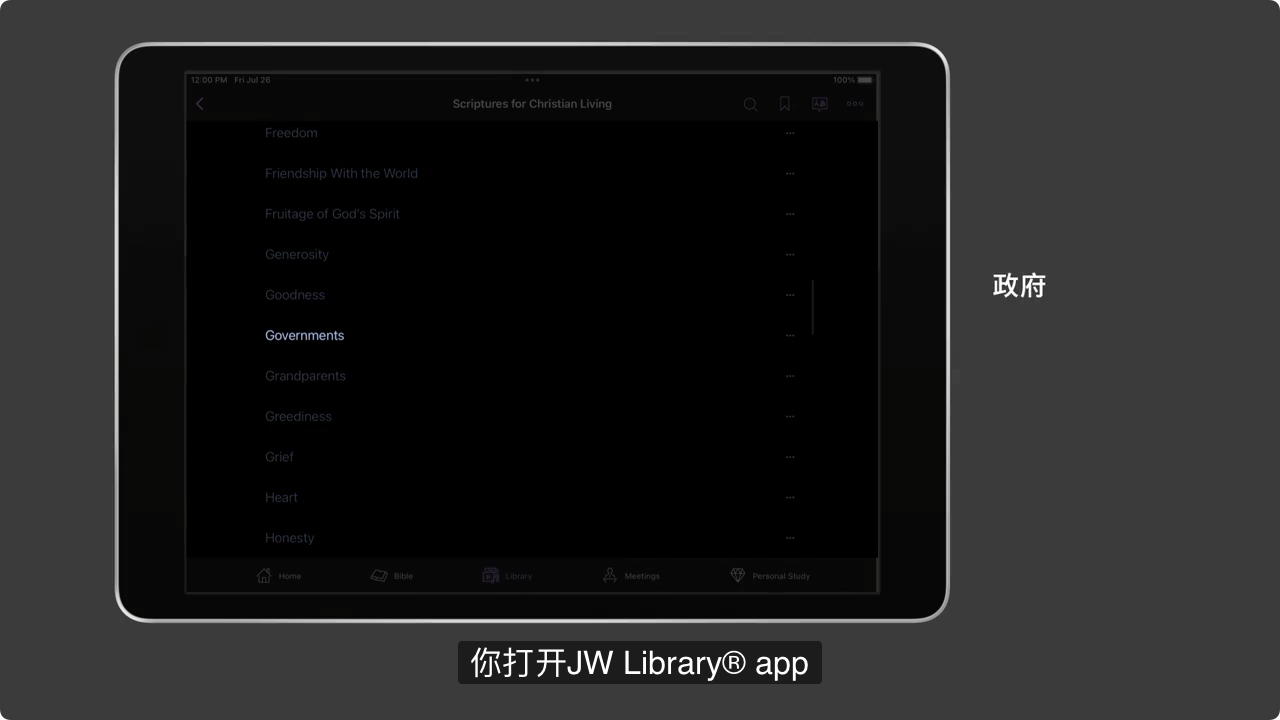
How much should we let it bother us that “app” has been borrowed from English into Mandarin, even being written in Latin alphabet letters? Why might it be that it’s pronounced in Mandarin by saying out its letters?


“app” used in the Mandarin version of the 2024 Governing Body Update #5 video

Comments are enabled on this blog, so if you are so inclined, comment away!


A news feed for this blog is available here.


Saturday, May 04, 2024

MEotW: gāogē

The Mandarin Expression of the Week is:

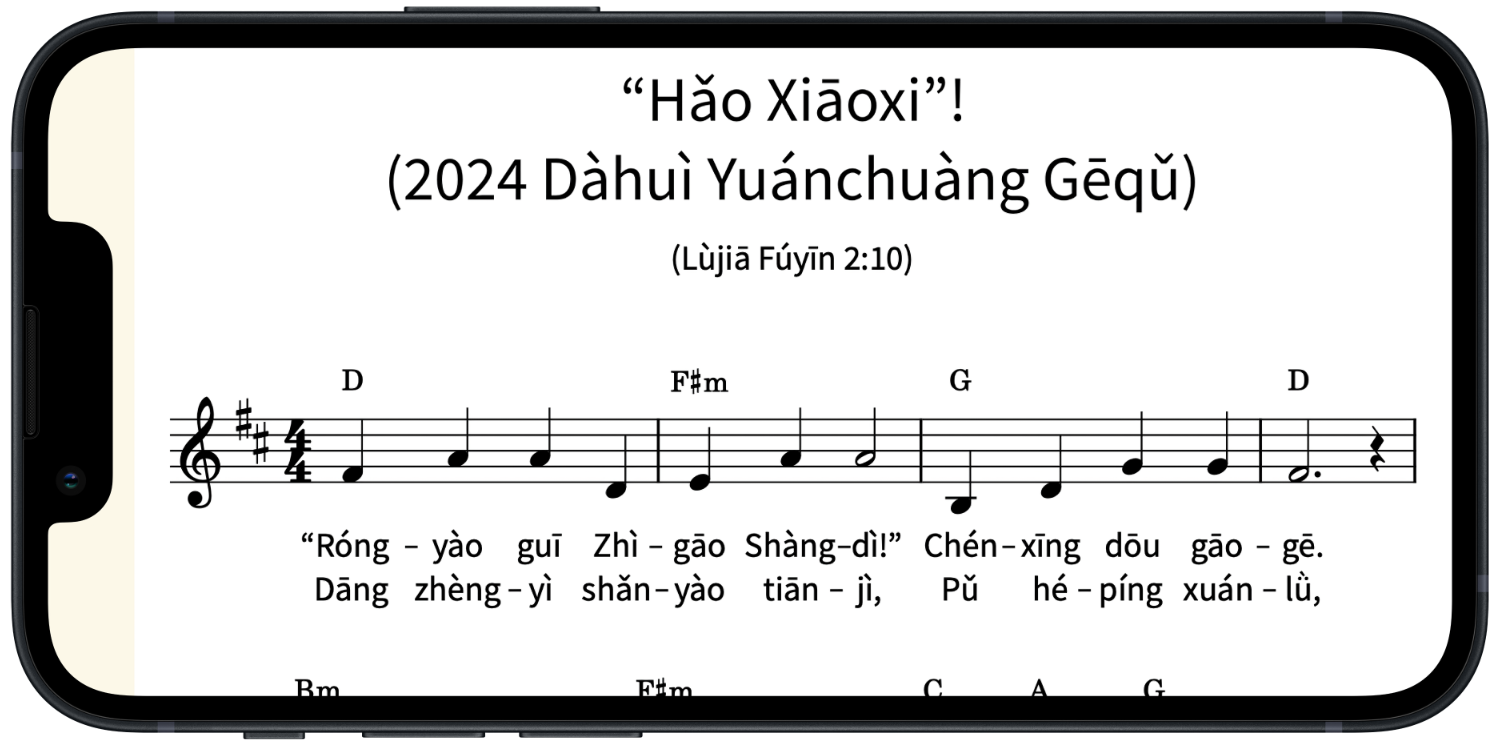
What can help us to sing like the angels at Mandarin meetings, conventions, etc.?


2024 convention song “‘Hǎo Xiāoxi’!” (music+_Pīnyīn_), on iPhone (landscape orientation)

The 2024 convention song “‘Hǎo Xiāoxi’!” (music+Pīnyīn), on an iPhone (landscape orientation)


Comments are enabled on this blog, so if you are so inclined, comment away!


A news feed for this blog is available here.


Friday, November 10, 2023

Use Pīnyīn as a Full Writing System, Serve Jehovah Better in the Mandarin Field

Friday, September 23, 2022

Safari Extension for Adding Pīnyīn, etc. to Web Pages

In addition to the existing Android-based solutions for adding Pīnyīn, etc. to web pages with Chinese characters, the following Safari extension that works on Apple mobile devices is now available, and has been added to the list on tiandi.info/apps:

  • Chinese words separator
    (Safari web browser extension,
    iOS/iPadOS 15.0 or later required,
    “Color, space, pinyin, zhuyin/bopomofo, tone, HSK for Chinese words. Dictionary: read more, hover less with sentence dictionary. Convert between Traditional and Simplified characters.”)
  • Short Link:
    tiandi.info/apps

BTW, this extension also works on Safari on Mac computers (macOS 12.0 or later required).


I have been informed that this extension is available for free until September 25; I have no information about what the price will be after that.


Wednesday, August 04, 2021

Learn From the Bible Bk. Pīnyīn Plus Web Resource Icon Can Now be Added to the Home Screen

[NOTE: For spiritual food (which is for you yourself to learn spiritual things from, and which ideally should be in your own mother tongue), please go to jw.org.


The supplementary language-learning material mentioned in this post is for helping you to learn about how the Mandarin language is used in an official publication, so that you will be better able to help others in the Mandarin language field.]


Nowadays, when we want to get a certain job done, many of us will reach for a smartphone or other computing device and look for a particular icon on the device’s home screen, since “there’s an app for that”. Now, Pīnyīn Plus web resources are in the process of adopting the ability of a Progressive Web App (PWA) to be installed on a user’s computing device and to add an icon to its home screen.


PWA Logo


Combined with the ability to be used while offline (not connected to the Internet), this allows a suitably upgraded Pīnyīn Plus web resource to be launched from an icon on a computing device’s home screen and then just work like we have come to expect an app to work, even when the device is not connected to the Internet.


Installing a PWA and Adding Its Icon to the Home Screen

Installing a PWA and adding its website icon to your device’s home screen is simple. Instructions on how to add a PWA website’s icon to the home screen of an iPhone/iPad can be found here/here (at the bottom of each web page), and instructions on how to add a PWA website’s icon to the home screen of an Android phone using the Google Chrome web browser can be found here. On that same web page, instructions on how to add a PWA website’s icon on a Windows, Mac, or Linux PC-type computer using Google Chrome can be found here. (Recent desktop/laptop versions of the Microsoft Edge web browser work similarly, since they are now based on the same Chromium technology that desktop/laptop versions of Google Chrome are based on.) A chart showing what web browsers support this Add to home screen feature can be found here.


Installable Pīnyīn Plus Web Resources with Icons

So far, the following Pīnyīn Plus web resources have been given the PWA-style ability to be installed on a computing device and to add an icon to its home screen:


  • Learn From the Bible Bk. Pīnyīn Plus web icon
  • Learn From the Bible Bk.
    (Pīnyīn Plus, Web)

    (rich information about Mandarin speech
    for discussing Bible lessons and accounts,
    as represented by the text of the
    Mandarin Learn From the Bible book,
    2018-04 Printing, proofread, mobile-friendly,
    PWA Logo can be used offline in supporting browsers,
    PWA Logo icon can be added to the home screen
    with supporting browsers,

    “flashcards” integrated with the text,
    (tap/click on a Pīnyīn word to reveal its “flashcard”,
    tap/click on a “flashcard” to hide it),
    Pīnyīn (Pinyin) used as the default writing system,
    carefully done human-translated
    context-appropriate English translations
    with literal & effective meanings,
    Simplified & Traditional characters,
    📖 Reveal All, 📄 Reveal Advanced,
    and 📘 Reveal None controls for
    all the “flashcards” in a lesson, paragraph, etc.,
    links for getting around,
    picture thumbnails & links, audio links,
    Night Theme that can be turned on or off
    using the ☀️/🌙 button at the top right,
    adjustable text size)
    (Info re offline viewing and printing)
  • Short Links:
    Links > Publications > Books >
    Learn From the Bible Book Links (tiandi.info/lfb)

  • Enjoy Life Forever! Br. Pīnyīn Plus web icon
  • Enjoy Life Forever! Br.
    (Pīnyīn Plus, Web)

    (rich information about Mandarin speech
    for discussing basic Bible teachings,
    as represented by the text of the
    Mandarin Enjoy Life Forever! brochure,
    2021-01 Printing, proofread, mobile-friendly,
    PWA Logo can be used offline in supporting browsers,
    PWA Logo icon can be added to the home screen
    with supporting browsers,

    “flashcards” integrated with the text,
    (tap/click on a Pīnyīn word to reveal its “flashcard”,
    tap/click on a “flashcard” to hide it),
    Pīnyīn (Pinyin) used as the default writing system,
    carefully done human-translated
    context-appropriate English translations
    with literal & effective meanings,
    Simplified & Traditional characters,
    📖 Reveal All, 📄 Reveal Advanced,
    and 📘 Reveal None controls for
    all the “flashcards” in a lesson, paragraph, etc.,
    links for getting around,
    picture thumbnails & links, audio links,
    video thumbnails, links, & transcripts,
    Night Theme that can be turned on or off
    using the ☀️/🌙 button at the top right,
    adjustable text size)
    (Info re offline viewing and printing)
  • Short Links:
    Links > Publications > Brochures >
    Enjoy Life Forever! Brochure Links (tiandi.info/lffi)

  • Bible Teach Bk. Pīnyīn Plus web icon
  • Bible Teach Bk.
    (Pīnyīn Plus, Scriptures, Web)

    (rich information about Mandarin speech
    for discussing important Bible teachings,
    as represented by the text of the
    Mandarin Bible Teach book,
    2017-03 Printing, proofread, mobile-friendly,
    PWA Logo can be used offline in supporting browsers,
    PWA Logo icon can be added to the home screen
    with supporting browsers,

    “flashcards” integrated with the text
    (tap/click on a Pīnyīn word to reveal its “flashcard”,
    tap/click on a “flashcard” to hide it),
    Pīnyīn (Pinyin) used as the default writing system,
    carefully done human-translated
    context-appropriate English translations
    with literal & effective meanings,
    Simplified & Traditional characters,
    📖 Reveal All, 📄 Reveal Advanced, and
    📘 Reveal None controls
    for all the “flashcards” in a
    chapter, paragraph, etc.,
    links for getting around,
    picture thumbnails & links, audio links,
    Night Theme that can be turned on or off
    using the ☀️/🌙 button at the top right,
    adjustable text size)
    (Info re offline viewing and printing)
  • Short Links:
    Links > Publications > Books >
    Bible Teach Book Links (tiandi.info/bh)

  • Jehovah’s Will Br. Pīnyīn Plus web icon
  • Jehovah’s Will Br.
    (Pīnyīn Plus, Scriptures, Web)

    (rich information about Mandarin speech
    for discussing the people, the activities,
    and the organization of Jehovah’s Witnesses,
    as represented by the text of the
    Mandarin Jehovah’s Will brochure,
    2016-11 Printing, proofread, mobile-friendly,
    PWA Logo can be used offline in supporting browsers,
    PWA Logo icon can be added to the home screen
    with supporting browsers,

    “flashcards” integrated with the text,
    (tap/click on a Pīnyīn word to reveal its “flashcard”,
    tap/click on a “flashcard” to hide it),
    Pīnyīn (Pinyin) used as the default writing system,
    carefully done human-translated
    context-appropriate English translations
    with literal & effective meanings,
    Simplified & Traditional characters,
    📖 Reveal All, 📄 Reveal Advanced,
    and 📘 Reveal None controls for
    all the “flashcards” in a lesson, paragraph, etc.,
    links for getting around,
    picture thumbnails & links, audio links,
    Night Theme that can be turned on or off
    using the ☀️/🌙 button at the top right,
    adjustable text size)
    (Info re offline viewing and printing)
  • Short Links:
    Links > Publications > Brochures >
    Jehovah’s Will Brochure Links (tiandi.info/jl)

  • Pīnyīn Plus Expressions web icon
  • Pīnyīn Plus Expressions
    (Pīnyīn (Pinyin) used as the default writing system,
    proofread, mobile-friendly,
    PWA Logo can be used offline in supporting browsers,
    PWA Logo icon can be added to the home screen
    with supporting browsers,

    “flashcards” integrated with the text,
    (tap/click on a Pīnyīn word to reveal its “flashcard”,
    tap/click on a “flashcard” to hide it),
    carefully done human-translated
    English translations with literal & effective meanings,
    Simplified & Traditional characters,
    📖 Reveal All, 📄 Reveal Advanced,
    and 📘 Reveal None controls for
    all the “flashcards” in a paragraph, etc.,
    sorted mainly by Pīnyīn,
    links for index headings,
    Night Theme that can be turned on or off
    using the ☀️/🌙 button at the top right,
    adjustable text size)
    (Notes on offline usage)
  • Short Links:
    Links > Vocabulary Lists >
    Pīnyīn Plus Resources (tiandi.info/pyp)

  • “God’s Love” Bk. Pīnyīn Plus web icon
  • “God’s Love” Bk.
    (Pīnyīn Plus, Scriptures, Web)

    (rich information about Mandarin speech
    for discussing applying Bible truth,
    as represented by the text of the
    Mandarin “God’s Love” book,
    2017-02 Printing, proofread, mobile-friendly,
    PWA Logo can be used offline in supporting browsers,
    PWA Logo icon can be added to the home screen
    with supporting browsers,

    “flashcards” integrated with the text,
    (tap/click on a Pīnyīn word to reveal its “flashcard”,
    tap/click on a “flashcard” to hide it),
    Pīnyīn (Pinyin) used as the default writing system,
    carefully done human-translated
    context-appropriate English translations
    with literal & effective meanings,
    Simplified & Traditional characters,
    📖 Reveal All, 📄 Reveal Advanced,
    and 📘 Reveal None controls for
    all the “flashcards” in a chapter, paragraph, etc.,
    links for getting around,
    picture thumbnails & links, audio links,
    Night Theme that can be turned on or off
    using the ☀️/🌙 button at the top right,
    adjustable text size)
    (Info re offline viewing and printing)
  • Short Links:
    Links > Publications > Books >
    “God’s Love” Book Links (tiandi.info/lv)

  • Good News Br. Pīnyīn Plus web icon
  • Good News Br.
    (Pīnyīn Plus, Scriptures, Web)

    (rich information about Mandarin speech
    for discussing basic Bible teachings,
    as represented by the text of the
    Mandarin Good News brochure,
    2019-08 Printing, proofread, mobile-friendly,
    PWA Logo can be used offline in supporting browsers,
    PWA Logo icon can be added to the home screen
    with supporting browsers,

    “flashcards” integrated with the text,
    (tap/click on a Pīnyīn word to reveal its “flashcard”,
    tap/click on a “flashcard” to hide it),
    Pīnyīn (Pinyin) used as the default writing system,
    carefully done human-translated
    context-appropriate English translations
    with literal & effective meanings,
    Simplified & Traditional characters,
    📖 Reveal All, 📄 Reveal Advanced,
    and 📘 Reveal None controls for
    all the “flashcards” in a lesson, paragraph, etc.,
    links for getting around,
    picture thumbnails & links, audio links,
    video thumbnails & links,
    Night Theme that can be turned on or off
    using the ☀️/🌙 button at the top right,
    adjustable text size)
    (Info re offline viewing and printing)
  • Short Links:
    Links > Publications > Brochures >
    Good News Brochure Links (tiandi.info/fg)

  • Teach Us Bk. Pīnyīn Plus web icon
  • Teach Us Bk.
    (Pīnyīn Plus, Scriptures, Web)

    (rich information about Mandarin speech
    for discussing important Bible teachings,
    as represented by the text of the
    Mandarin Teach Us book,
    2020-08 Printing, proofread, mobile-friendly,
    PWA Logo can be used offline in supporting browsers,
    PWA Logo icon can be added to the home screen
    with supporting browsers,

    “flashcards” integrated with the text
    (tap/click on a Pīnyīn word to reveal its “flashcard”,
    tap/click on a “flashcard” to hide it),
    Pīnyīn (Pinyin) used as the default writing system,
    carefully done human-translated
    context-appropriate English translations
    with literal & effective meanings,
    Simplified & Traditional characters,
    📖 Reveal All, 📄 Reveal Advanced, and
    📘 Reveal None controls
    for all the “flashcards” in a
    chapter, paragraph, etc.,
    links for getting around,
    picture thumbnails & links, audio links,
    Night Theme that can be turned on or off
    using the ☀️/🌙 button at the top right,
    adjustable text size)
    (Info re offline viewing and printing)
  • Short Links:
    Links > Publications > Books >
    Teach Us Book Links (tiandi.info/bhs)

As time allows, other Pīnyīn Plus web resources will also be enhanced with the ability to be installed on a computing device and to add an icon to its home screen.


Wednesday, March 10, 2021

The Pinyin Typist App Has Been Updated

The Pīnyīn Typist iOS/iPadOS app has been updated with support for the latest iPhones and iPads. Check it out!
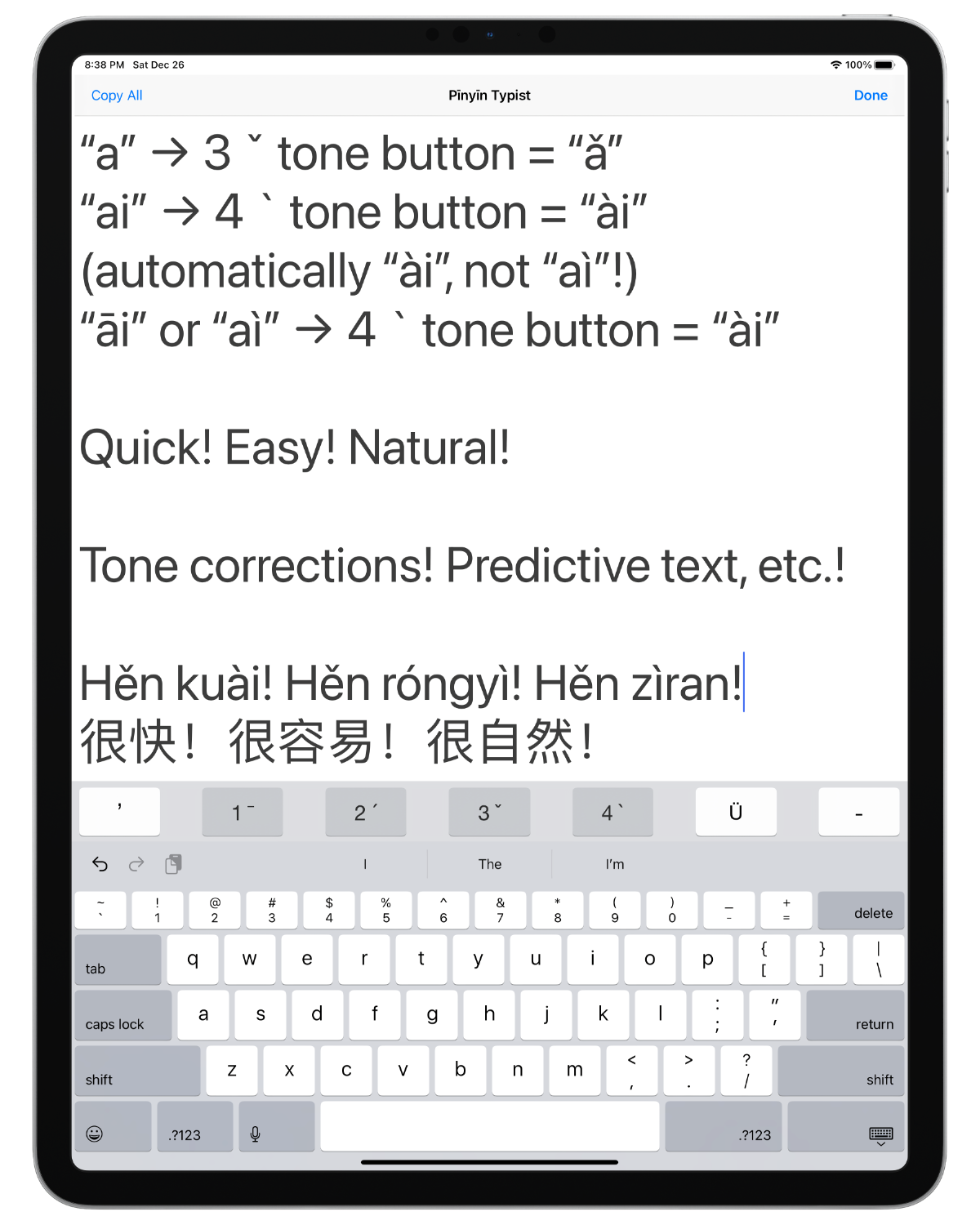

Pinyin Typist app screenshot

[Full disclosure: I am the developer of this app. That said, I sincerely believe it is one of the best ways, perhaps even the very best way, to quickly and easily type exactly the Pīnyīn you want on an iPad, iPhone, or iPod touch, especially if you want to type a lot of Pīnyīn, e.g., for a talk. For us language learners and teachers in the Mandarin field, this is a valuable capability to have.]

What’s New

NOTE: Progressing Apple technologies required the code for saving snippets to be rewritten. Everything has been working perfectly in testing, but if you have many snippets saved in Pīnyīn Typist, you may want to back some or all of them up elsewhere before installing this update of Pīnyīn Typist.

  • Support for recent iPhones and iPads and Apple software technologies has been added or improved.
  • iOS 11 or above is now required.
  • The bug where sometimes in the Pīnyīn Typing tab view the software keyboard covered the lower part of the text view has been addressed.
  • On iOS/iPadOS 13 or above, hardware keyboard ⌨️ shortcuts are now available. (When a hardware keyboard is connected to your iPad, holding down one of the Command (⌘) keys will display a list of the available hardware keyboard shortcuts.)
  • The current system font (San Francisco) is now the default font, and it is now one of the available options to be the Pīnyīn Typing tab view font.
  • Command names have been revised for improved clarity and consistency.
  • An optional warning alert has been added for the Delete All command.
  • Other bug fixes and improvements

Not for Entering Characters?!

THIS APP IS NOT AN ALTERNATIVE WAY TO TYPE CHINESE CHARACTERS—it supports the standard iOS/iPadOS ways of typing characters.


There have long been built-in ways to type Chinese characters on iOS, Windows, macOS, etc., but when the iPhone and iPad were introduced, there was no way to type Pīnyīn with tone marks on them. The Pinyin Typist app was developed as the first app to provide this capability that is important and useful to Mandarin language learners and teachers.


While many in the world–and some in the Mandarin field—only care about characters and look down on Pīnyīn, the truth is that Pīnyīn works well as a simple full writing system for Mandarin, for anyone who can overcome the pressures from mere human traditions that dictate the use of characters, and who can overcome the prejudice with which many unfortunately thus view Pīnyīn.


Not Free?!

When Jesus said “you received free, give free”, he was specifically referring to the Kingdom message that we preach. (Matthew 10:8) It would not be appropriate to take these words to mean that Jesus’ followers should expect that their fellow workers must give them general-purpose tools or resources for free—some among Jesus’ followers may decide to do so in certain circumstances, but they are not under any obligation to do so.


For example, it’s true that some general-purpose items like sandals were particularly useful to first-century evangelizers as they carried out their ministry, but that doesn’t mean that Christians who made sandals were obligated to always give their fellow Christians free sandals! Similarly, while some general-purpose things like cars, shoes, and general-purpose apps like Microsoft Word and Pinyin Typist may be particulary useful to us modern-day evangelizers as we carry out our ministry, that doesn’t mean that we should expect fellow Christians who deal in cars, shoes, or general-purpose apps to always give us such things for free. Note that soon after Jesus said regarding the Kingdom message that “you received free, give free”, he cited the general principle that “the worker deserves his food”.—Matthew 10:10.


In my case, as the developer of Pinyin Typist, getting paid for the work I put into Pinyin Typist helps me to pay for the food, etc. that I need in order to keep on maintaining and improving, not only Pinyin Typist, but also the free language-learning resources that I produce for language learners in the Mandarin field. Without sufficient income from Pinyin Typist or other apps that I may develop part-time, I may be forced to take other work that would likely reduce the amount of time and effort I can spend on free language-learning resources for the Mandarin field.

Not Just $1?!

It is unfortunate that the culture of the App Store has become such that many people expect apps to be free, or at most, to only cost $1. Developing apps, especially good apps, actually takes a lot of time and a lot of work, so joining in a culturally mandated “race to the bottom” is simply unsustainable for many app developers. While I am not personally acquainted with the circumstances, one possible example of this is that for a while, a brother had a pretty good free app on the App Store for typing Pīnyīn, called Pure Pinyin. However, this app is no longer available on the App Store.


In contrast to the prevailing culture in the world of people not being willing to pay for apps that could serve them well for years, many publishers, especially in Western lands, customarily regularly take coffee breaks from their preaching work, during which they will uncomplainingly pay several dollars for a coffee or a similar drink that will serve them for a few minutes. Even if coffee or similar drinks and apps are not perfectly comparable, that’s still something to think about.


In recent years, alternative business models such as in-app purchases and subscriptions have become available for paid apps, to hopefully enable more apps to be sustainably developed. For now, Pinyin Typist is available for a one-time purchase price that is less than or about the same as the price of a typical drink at a coffee shop, and it could become a very useful tool for you in the Mandarin field for many years, if you have an iPad, iPhone, or iPod touch.


Saturday, February 13, 2021

Bible Teach Bk. Pīnyīn Plus Web Resource Icon Can Now be Added to the Home Screen

[NOTE: For spiritual food (which is for you yourself to learn spiritual things from, and which ideally should be in your own mother tongue), please go to jw.org.


The supplementary language-learning material mentioned in this post is for helping you to learn about how the Mandarin language is used in an official publication, so that you will be better able to help others in the Mandarin language field.]


Nowadays, when we want to get a certain job done, many of us will reach for a smartphone or other computing device and look for a particular icon on the device’s home screen, since “there’s an app for that”. Now, Pīnyīn Plus web resources are in the process of adopting the ability of a Progressive Web App (PWA) to be installed on a user’s computing device and to add an icon to its home screen.


PWA Logo


Combined with the ability to be used while offline (not connected to the Internet), this allows a suitably upgraded Pīnyīn Plus web resource to be launched from an icon on a computing device’s home screen and then just work like we have come to expect an app to work, even when the device is not connected to the Internet.


Installing a PWA and Adding Its Icon to the Home Screen

Installing a PWA and adding its website icon to your device’s home screen is simple. Instructions on how to add a PWA website’s icon to the home screen of an iPhone/iPad can be found here/here (at the bottom of each web page), and instructions on how to add a PWA website’s icon to the home screen of an Android phone using the Google Chrome web browser can be found here. On that same web page, instructions on how to add a PWA website’s icon on a Windows, Mac, or Linux PC-type computer using Google Chrome can be found here. (Recent desktop/laptop versions of the Microsoft Edge web browser work similarly, since they are now based on the same Chromium technology that desktop/laptop versions of Google Chrome are based on.) A chart showing what web browsers support this Add to home screen feature can be found here.


Installable Pīnyīn Plus Web Resources with Icons

So far, the following Pīnyīn Plus web resources have been given the PWA-style ability to be installed on a computing device and to add an icon to its home screen:


  • Bible Teach Bk. Pīnyīn Plus web icon
  • Bible Teach Bk.
    (Pīnyīn Plus, Scriptures, Web)

    (rich information about Mandarin speech
    for discussing important Bible teachings,
    as represented by the text of the
    Mandarin Bible Teach book,
    2017-03 Printing, proofread, mobile-friendly,
    PWA Logo can be used offline in supporting browsers,
    PWA Logo icon can be added to the home screen
    with supporting browsers,

    “flashcards” integrated with the text
    (tap/click on a Pīnyīn word to reveal its “flashcard”,
    tap/click on a “flashcard” to hide it),
    Pīnyīn (Pinyin) used as the default writing system,
    carefully done human-translated
    context-appropriate English translations
    with literal & effective meanings,
    Simplified & Traditional characters,
    📖 Reveal All, 📄 Reveal Advanced, and
    📘 Reveal None controls
    for all the “flashcards” in a
    chapter, paragraph, etc.,
    links for getting around,
    picture thumbnails & links, audio links,
    Night Theme that can be turned on or off
    using the ☀️/🌙 button at the top right,
    adjustable text size)
    (Info re offline viewing and printing)
  • Short Links:
    Links > Publications > Books >
    Bible Teach Book Links (tiandi.info/bh)

  • Jehovah’s Will Br. Pīnyīn Plus web icon
  • Jehovah’s Will Br.
    (Pīnyīn Plus, Scriptures, Web)

    (rich information about Mandarin speech
    for discussing the people, the activities,
    and the organization of Jehovah’s Witnesses,
    as represented by the text of the
    Mandarin Jehovah’s Will brochure,
    2016-11 Printing, proofread, mobile-friendly,
    PWA Logo can be used offline in supporting browsers,
    PWA Logo icon can be added to the home screen
    with supporting browsers,

    “flashcards” integrated with the text,
    (tap/click on a Pīnyīn word to reveal its “flashcard”,
    tap/click on a “flashcard” to hide it),
    Pīnyīn (Pinyin) used as the default writing system,
    carefully done human-translated
    context-appropriate English translations
    with literal & effective meanings,
    Simplified & Traditional characters,
    📖 Reveal All, 📄 Reveal Advanced,
    and 📘 Reveal None controls for
    all the “flashcards” in a lesson, paragraph, etc.,
    links for getting around,
    picture thumbnails & links, audio links,
    Night Theme that can be turned on or off
    using the ☀️/🌙 button at the top right,
    adjustable text size)
    (Info re offline viewing and printing)
  • Short Links:
    Links > Publications > Brochures >
    Jehovah’s Will Brochure Links (tiandi.info/jl)

  • Pīnyīn Plus Expressions web icon
  • Pīnyīn Plus Expressions
    (Pīnyīn (Pinyin) used as the default writing system,
    proofread, mobile-friendly,
    PWA Logo can be used offline in supporting browsers,
    PWA Logo icon can be added to the home screen
    with supporting browsers,

    “flashcards” integrated with the text,
    (tap/click on a Pīnyīn word to reveal its “flashcard”,
    tap/click on a “flashcard” to hide it),
    carefully done human-translated
    English translations with literal & effective meanings,
    Simplified & Traditional characters,
    📖 Reveal All, 📄 Reveal Advanced,
    and 📘 Reveal None controls for
    all the “flashcards” in a paragraph, etc.,
    sorted mainly by Pīnyīn,
    links for index headings,
    Night Theme that can be turned on or off
    using the ☀️/🌙 button at the top right,
    adjustable text size)
    (Notes on offline usage)
  • Short Links:
    Links > Vocabulary Lists >
    Pīnyīn Plus Resources (tiandi.info/pyp)

  • “God’s Love” Bk. Pīnyīn Plus web icon
  • “God’s Love” Bk.
    (Pīnyīn Plus, Scriptures, Web)

    (rich information about Mandarin speech
    for discussing applying Bible truth,
    as represented by the text of the
    Mandarin “God’s Love” book,
    2017-02 Printing, proofread, mobile-friendly,
    PWA Logo can be used offline in supporting browsers,
    PWA Logo icon can be added to the home screen
    with supporting browsers,

    “flashcards” integrated with the text,
    (tap/click on a Pīnyīn word to reveal its “flashcard”,
    tap/click on a “flashcard” to hide it),
    Pīnyīn (Pinyin) used as the default writing system,
    carefully done human-translated
    context-appropriate English translations
    with literal & effective meanings,
    Simplified & Traditional characters,
    📖 Reveal All, 📄 Reveal Advanced,
    and 📘 Reveal None controls for
    all the “flashcards” in a chapter, paragraph, etc.,
    links for getting around,
    picture thumbnails & links, audio links,
    Night Theme that can be turned on or off
    using the ☀️/🌙 button at the top right,
    adjustable text size)
    (Info re offline viewing and printing)
  • Short Links:
    Links > Publications > Books >
    “God’s Love” Book Links (tiandi.info/lv)

  • Good News Br. Pīnyīn Plus web icon
  • Good News Br.
    (Pīnyīn Plus, Scriptures, Web)

    (rich information about Mandarin speech
    for discussing basic Bible teachings,
    as represented by the text of the
    Mandarin Good News brochure,
    2019-08 Printing, proofread, mobile-friendly,
    PWA Logo can be used offline in supporting browsers,
    PWA Logo icon can be added to the home screen
    with supporting browsers,

    “flashcards” integrated with the text,
    (tap/click on a Pīnyīn word to reveal its “flashcard”,
    tap/click on a “flashcard” to hide it),
    Pīnyīn (Pinyin) used as the default writing system,
    carefully done human-translated
    context-appropriate English translations
    with literal & effective meanings,
    Simplified & Traditional characters,
    📖 Reveal All, 📄 Reveal Advanced,
    and 📘 Reveal None controls for
    all the “flashcards” in a lesson, paragraph, etc.,
    links for getting around,
    picture thumbnails & links, audio links,
    video thumbnails & links,
    Night Theme that can be turned on or off
    using the ☀️/🌙 button at the top right,
    adjustable text size)
    (Info re offline viewing and printing)
  • Short Links:
    Links > Publications > Brochures >
    Good News Brochure Links (tiandi.info/fg)

  • Teach Us Bk. Pīnyīn Plus web icon
  • Teach Us Bk.
    (Pīnyīn Plus, Scriptures, Web)

    (rich information about Mandarin speech
    for discussing important Bible teachings,
    as represented by the text of the
    Mandarin Teach Us book,
    2020-08 Printing, proofread, mobile-friendly,
    PWA Logo can be used offline in supporting browsers,
    PWA Logo icon can be added to the home screen
    with supporting browsers,

    “flashcards” integrated with the text
    (tap/click on a Pīnyīn word to reveal its “flashcard”,
    tap/click on a “flashcard” to hide it),
    Pīnyīn (Pinyin) used as the default writing system,
    carefully done human-translated
    context-appropriate English translations
    with literal & effective meanings,
    Simplified & Traditional characters,
    📖 Reveal All, 📄 Reveal Advanced, and
    📘 Reveal None controls
    for all the “flashcards” in a
    chapter, paragraph, etc.,
    links for getting around,
    picture thumbnails & links, audio links,
    Night Theme that can be turned on or off
    using the ☀️/🌙 button at the top right,
    adjustable text size)
    (Info re offline viewing and printing)
  • Short Links:
    Links > Publications > Books >
    Teach Us Book Links (tiandi.info/bhs)

As time allows, other Pīnyīn Plus web resources will also be enhanced with the ability to be installed on a computing device and to add an icon to its home screen.