The Pīnyīn Typist iOS/iPadOS app has been updated with support for the latest iPhones and iPads. Check it out!
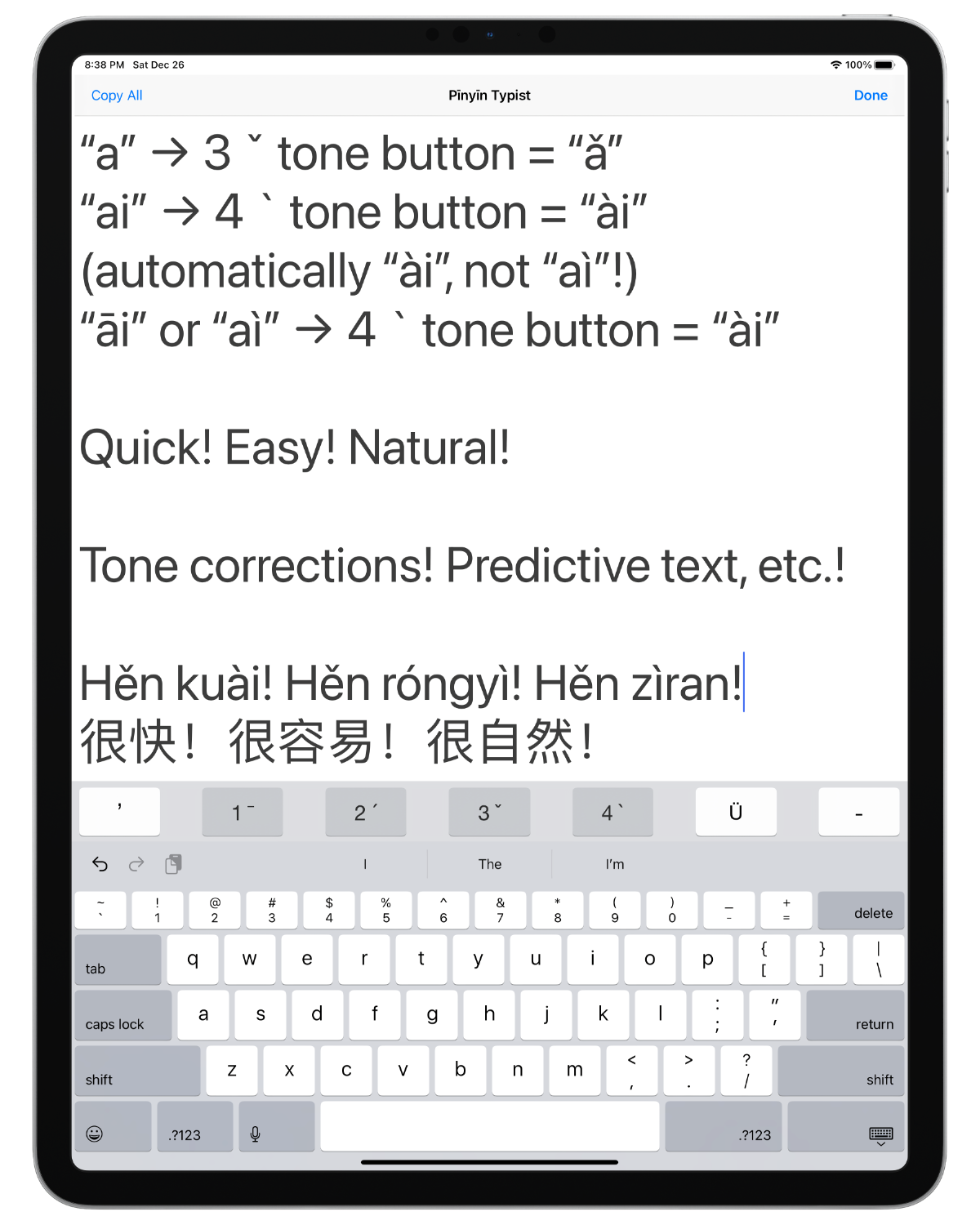
[Full disclosure: I am the developer of this app. That said, I sincerely believe it is one of the best ways, perhaps even the very best way, to quickly and easily type exactly the Pīnyīn you want on an iPad, iPhone, or iPod touch, especially if you want to type a lot of Pīnyīn, e.g., for a talk. For us language learners and teachers in the Mandarin field, this is a valuable capability to have.]
What’s New
NOTE: Progressing Apple technologies required the code for saving snippets to be rewritten. Everything has been working perfectly in testing, but if you have many snippets saved in Pīnyīn Typist, you may want to back some or all of them up elsewhere before installing this update of Pīnyīn Typist.
- Support for recent iPhones and iPads and Apple software technologies has been added or improved.
- iOS 11 or above is now required.
- The bug where sometimes in the Pīnyīn Typing tab view the software keyboard covered the lower part of the text view has been addressed.
- On iOS/iPadOS 13 or above, hardware keyboard ⌨️ shortcuts are now available. (When a hardware keyboard is connected to your iPad, holding down one of the Command (⌘) keys will display a list of the available hardware keyboard shortcuts.)
- The current system font (San Francisco) is now the default font, and it is now one of the available options to be the Pīnyīn Typing tab view font.
- Command names have been revised for improved clarity and consistency.
- An optional warning alert has been added for the Delete All command.
- Other bug fixes and improvements
Not for Entering Characters?!
THIS APP IS NOT AN ALTERNATIVE WAY TO TYPE CHINESE CHARACTERS—it supports the standard iOS/iPadOS ways of typing characters.
There have long been built-in ways to type Chinese characters on iOS, Windows, macOS, etc., but when the iPhone and iPad were introduced, there was no way to type Pīnyīn with tone marks on them. The Pinyin Typist app was developed as the first app to provide this capability that is important and useful to Mandarin language learners and teachers.
While many in the world–and some in the Mandarin field—only care about characters and look down on Pīnyīn, the truth is that Pīnyīn works well as a simple full writing system for Mandarin, for anyone who can overcome the pressures from mere human traditions that dictate the use of characters, and who can overcome the prejudice with which many unfortunately thus view Pīnyīn.
Not Free?!
When Jesus said “you received free, give free”, he was specifically referring to the Kingdom message that we preach. (Matthew 10:8) It would not be appropriate to take these words to mean that Jesus’ followers should expect that their fellow workers must give them general-purpose tools or resources for free—some among Jesus’ followers may decide to do so in certain circumstances, but they are not under any obligation to do so.
For example, it’s true that some general-purpose items like sandals were particularly useful to first-century evangelizers as they carried out their ministry, but that doesn’t mean that Christians who made sandals were obligated to always give their fellow Christians free sandals! Similarly, while some general-purpose things like cars, shoes, and general-purpose apps like Microsoft Word and Pinyin Typist may be particulary useful to us modern-day evangelizers as we carry out our ministry, that doesn’t mean that we should expect fellow Christians who deal in cars, shoes, or general-purpose apps to always give us such things for free. Note that soon after Jesus said regarding the Kingdom message that “you received free, give free”, he cited the general principle that “the worker deserves his food”.—Matthew 10:10.
In my case, as the developer of Pinyin Typist, getting paid for the work I put into Pinyin Typist helps me to pay for the food, etc. that I need in order to keep on maintaining and improving, not only Pinyin Typist, but also the free language-learning resources that I produce for language learners in the Mandarin field. Without sufficient income from Pinyin Typist or other apps that I may develop part-time, I may be forced to take other work that would likely reduce the amount of time and effort I can spend on free language-learning resources for the Mandarin field.
Not Just $1?!
It is unfortunate that the culture of the App Store has become such that many people expect apps to be free, or at most, to only cost $1. Developing apps, especially good apps, actually takes a lot of time and a lot of work, so joining in a culturally mandated “race to the bottom” is simply unsustainable for many app developers. While I am not personally acquainted with the circumstances, one possible example of this is that for a while, a brother had a pretty good free app on the App Store for typing Pīnyīn, called Pure Pinyin. However, this app is no longer available on the App Store.
In contrast to the prevailing culture in the world of people not being willing to pay for apps that could serve them well for years, many publishers, especially in Western lands, customarily regularly take coffee breaks from their preaching work, during which they will uncomplainingly pay several dollars for a coffee or a similar drink that will serve them for a few minutes. Even if coffee or similar drinks and apps are not perfectly comparable, that’s still something to think about.
In recent years, alternative business models such as in-app purchases and subscriptions have become available for paid apps, to hopefully enable more apps to be sustainably developed. For now, Pinyin Typist is available for a one-time purchase price that is less than or about the same as the price of a typical drink at a coffee shop, and it could become a very useful tool for you in the Mandarin field for many years, if you have an iPad, iPhone, or iPod touch.
